Blog
Four Skills to Get Started With Skills
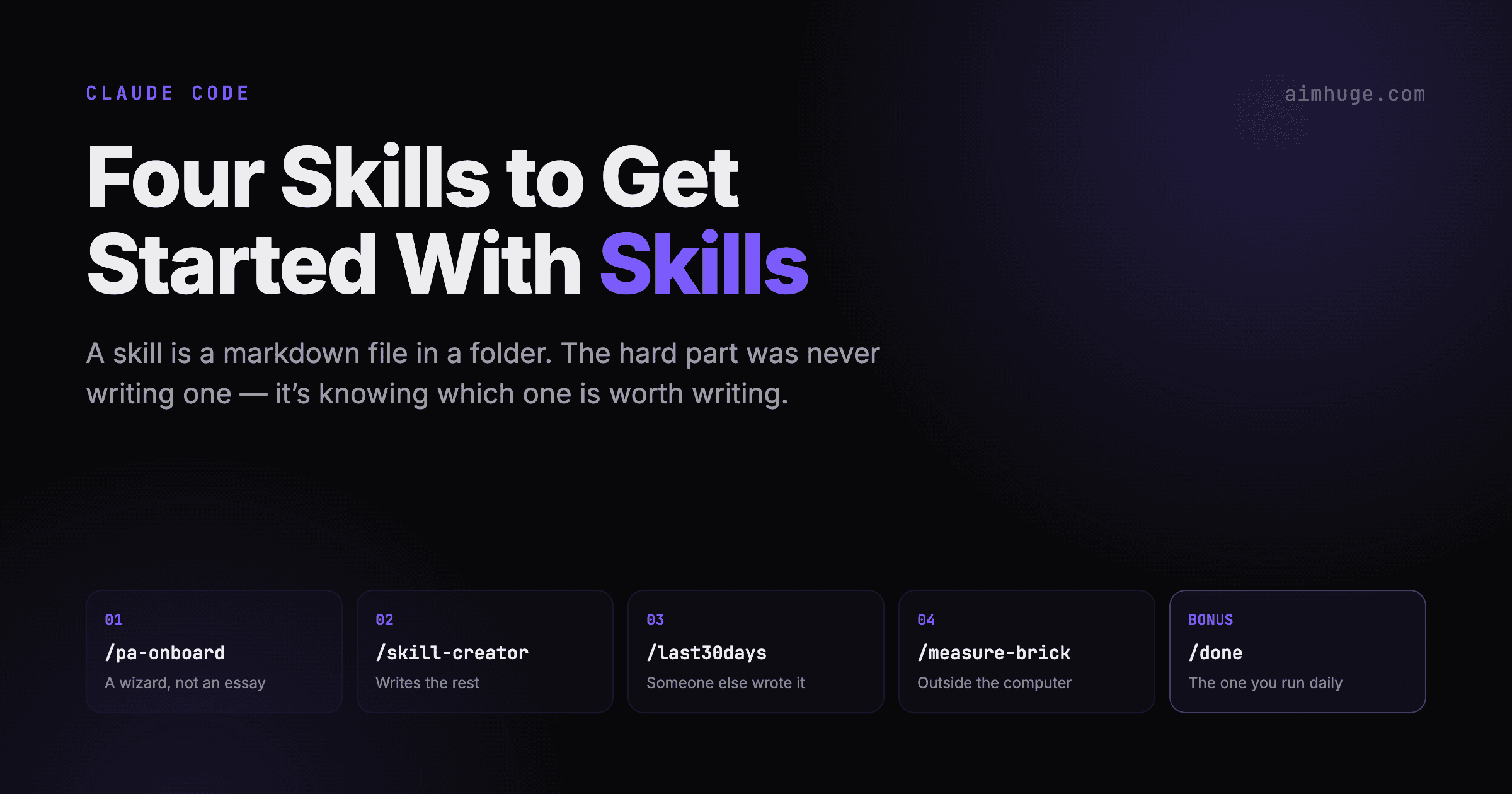
A skill is a markdown file in a folder. That's the whole format. Which means the hard part was never writing one — it's knowing which one is worth writing. These five are the ones I hand people, in this order: a wizard that configures your morning agent, the one that writes all the others, one you install instead of writing, one that reaches outside the computer entirely, and one you'll run every day until you forget it was ever optional.
September 2026 · Alex Miller
The Shortlist
Each one teaches a different thing about what skills are for. Run them in order and you'll have the whole map.
01
/pa-onboard
A wizard, not an essay
Seven questions about your week, and the answers get written into the scheduled agent that runs your mornings.
02
/skill-creator
The one that writes the rest
Anthropic's own. Drafts a skill, then runs evals against it so you find out whether it actually fires.
03
/last30days
Someone else wrote it
A 1,400-line research skill you install rather than write. Shows you what a mature skill looks like.
04
/measure-brick
Reaches outside the computer
Reads the USB-C Power Delivery profile off your Mac's battery controller. Found a counterfeit charger.
05
/done
The one you run daily
Wraps up a coding session — docs, lint, tests, commit — in about fifty seconds.
Thirty Seconds on What a Skill Is
A skill is a file at .claude/skills/<name>/SKILL.md. YAML frontmatter at the top says what it's called and when to use it. Everything below is markdown instructions. Type /name and those instructions get handed to Claude as the plan for the next few minutes.
The frontmatter description is doing more work than it looks like. It's not documentation — it's the trigger. Claude reads every installed skill's description and fires the matching one when your request sounds like it. Write the description in the words you'd actually use and the skill starts running without you typing a slash at all.
If you want the long version, I wrote up the anatomy of a /done skill line by line. This post is the tour, not the manual.
01
/pa-onboardA wizard, not an essay
I have a scheduled agent that runs at 6:30 every weekday morning, reads my email, puts real commitments on my calendar and pushes me a brief. It is genuinely useful and it was, for a while, genuinely wrong — because it knew nothing about my life that wasn't already in an inbox.
It couldn't know the school is seven minutes away, that my two kids finish at different times, or that the gym needs a shower after it and the shower needs to be on the calendar or the 10 AM call happens with wet hair. Those facts aren't in any email. Somebody has to ask.
So: a skill that asks. And I wrote it badly four times before going to look at how people actually ship this. The answer was deflating and correct — pa-onboard from the Waywiser project, a numbered setup wizard whose last line reads: thinking level: low — this is a setup wizard, not complex analysis.
Every step is the same three beats. A question written out verbatim, a default so skipping is free, and the actions to take:
### 5. Recurring commitments

Ask: "What happens at the same time every week? School run,
gym, classes, standing calls — and how far away is each one?"
Default: none.

Actions:
- Distance is the question that matters: it turns one stated
  time into a correct block. 7 minutes away and a 15:40
  pick-up is 15:33–15:50.
- Anything needing time either side — a drive, a shower, a
  changeover — is part of the block, not a separate event.
- Write these into the daily routine's instructions as
  explicit rules with times, days and offsets.
Distance is the question that matters. “What time is pick-up?” gets you one number. “How far is the school?” gets you every pick-up, every drop-off, and every morning you can't take a 7:30 call — forever. Ask for the arithmetic, not the preference.
In practice it reads like a form that talks back, which is exactly what you want at seven in the morning:
Claude:  I'm setting up your PA. Seven questions — skip any
         and I'll use a sensible default.

Claude:  1/7 What timezone, working hours and days?
         (default: Mon–Fri 09:00–18:00)
User:    Bangkok, 8–6, Mon–Fri

Claude:  2/7 Want a morning brief? You already have one —
         "Daily brief + real commitments", weekdays 06:30.
         Keep it as is?
User:    yes

Claude:  5/7 What happens at the same time every week, and
         how far away?
User:    school run — drop 07:50, Lisl out 15:40,
         Dion 17:30 Tue/Thu, 7 min away

Claude:  So 🚗 Drop off 07:43–08:00, Pick up Lisl 15:33–15:50,
         Pick up Dion 17:23–17:40 Tue/Thu. Adding those to
         the routine's rules. Right?
The step I added is the one born from my own wreckage. An earlier version of that morning agent decided to be helpful and filled 07:00 to 21:00 with focus blocks, admin blocks and breaks. It looked thorough on day one and like clutter by day three, and then I deleted all of it and stopped trusting any of it.
So the wizard asks what should not go on the calendar, and writes the answer back with the reason still attached:
### 6. What does NOT go on the calendar

Ask: "Should the assistant put focus time, admin and breaks
on your calendar, or only real commitments?"
Default: only real commitments.

Actions: write the answer into the routine prompt as a
negative rule WITH ITS REASON ATTACHED:

  A previous version filled 07:00–21:00 with work blocks and
  breaks; the user hated it and deleted them all. Never
  create a block for focused work, admin, inbox, reading,
  breaks, buffers, meals or "planning".
That last detail is the one I'd take to every skill you write. A bare prohibition reads like an oversight, and a model trying to be useful will helpfully reinvent the thing you just banned. A prohibition with a corpse attached reads like a decision, and it survives.
02
/skill-creatorThe one that writes the rest
Once you've written one skill by hand you understand the format, and the honest next step is to stop writing them by hand. skill-creator is Anthropic's own, and the thing that makes it worth installing isn't the drafting. It's that it treats a skill as something you can be wrong about:
1. Decide what the skill should do
2. Write a draft
3. Write a few test prompts
4. Run Claude-with-the-skill on them
5. Grade the results — qualitatively AND quantitatively
6. Rewrite based on what the grading showed
7. Repeat until satisfied
8. Expand the test set, run it again at scale
Steps 3 to 5 are the ones nobody does on their own. It writes test prompts, runs Claude against your skill on each of them, and grades the results with a separate agent — so “does this skill work?” becomes a number instead of a feeling. It ships a grader, a comparator, and an HTML viewer for reading the runs.
It also has a separate pass for the one thing that quietly breaks most skills: they never fire in the first place. The frontmatter description is the trigger, and the documentation is blunt about the failure mode — Claude tends to undertrigger, skipping skills that would have helped. The fix is to write descriptions that are, in their word, pushy:
# Undertriggered — reads like documentation
description: How to build a simple fast dashboard to
  display internal data.

# Pushy — reads like a trigger
description: How to build a simple fast dashboard to
  display internal data. Make sure to use this skill
  whenever the user mentions dashboards, data
  visualization, internal metrics, or wants to display
  any kind of company data, even if they don't
  explicitly ask for a "dashboard."
That second version feels like over-explaining to a colleague. It isn't — it's a list of the moments you want the skill to wake up, and every phrase you leave out is a time it stays asleep. If your first skill never seems to run, this is almost always why, and it's a two-minute fix rather than a rewrite.
One nice touch in its own instructions: it tells Claude to watch how technical the user sounds and adjust. “Evaluation” and “benchmark” are fine; don't say “JSON” or “assertion” until you've seen evidence they'll land. A skill that knows who it's talking to is a better skill.
03
/last30daysThe one you don't write
Second lesson, and it saves more time than the first: you don't have to write them all. Skills are files, files get published, and installing someone else's is a git clone. /last30days by Matt van Horn is the one I point people at, because it does something genuinely hard — pulls what people actually said about a topic in the last month across Reddit, X, YouTube, TikTok, Hacker News, GitHub and the open web, then synthesizes it with the receipts attached.
But install it for the second reason: open the file and read it. It's over 1,400 lines, and almost none of that is features. It's guardrails — numbered LAWs about output format, a mandatory version badge on line one, a check for whether Claude loaded a stale copy of the skill from the wrong cache directory.
And it documents its own failures in the file, by date. There is a paragraph in there that says, in effect: on this day, eight runs out of eight ignored these instructions and improvised, here is exactly what that looked like, and here are the three structural anchors added to stop it. That's not defensive writing. That's a changelog of everything the model did wrong, converted into text that prevents it.
Which is the lesson worth paying for. A skill you've run twenty times is mostly a record of the twenty ways it went sideways and the sentence you added each time. Your first skill will be thirty lines. That's correct. The length comes from use, not from planning.
04
/measure-brickClaude Code can touch things that aren't code
I had a drawer of USB-C chargers. Eleven of them, all black, all anonymous, accumulated across four countries. Some charge a MacBook at full speed. Some are jewellery. No way to tell by looking, and the numbers printed on them are — as it turns out — not always true.
Here's the thing people miss about Claude Code: it's a terminal. Anything your shell can reach, a skill can reach. Your Mac negotiates a Power Delivery contract with whatever brick you plug in, and it will tell you the result if you ask the battery controller:
# Pull the live adapter dict from the battery controller.
ioreg -rn AppleSmartBattery \
  | grep -oE '"AppleRawAdapterDetails" = \(\{.*\}\)' | head -1
That's the whole trick. No API, no integration, no hardware — an 82-line shell script and a page of markdown that explains how to read what comes back. Plug in a brick, say “measure this charger,” get a verdict.
But the markdown is the skill, not the script. The script prints numbers; the skill knows that the live wattage is a lie. Near a full battery a Mac sips a few watts no matter how strong the brick is, so wattage ranks your chargers in roughly random order. The negotiated voltage is the truth: 5 V means legacy or slow, 9–15 V is partial PD, 20 V is a real laptop charger. Encoding that one judgement is the difference between a script and a skill.
Eleven bricks, ranked properly:
Brick                        Negotiated   Class              MacBook
──────────────────────────────────────────────────────────────────────
Home powerstrip              5 V · 15 W   legacy             ❌ slow
Yellow Lazada 4-port         5 V · 15 W   legacy             ❌ slow
White Miniso powerbank       5 V ·  8 W   legacy             ❌ slow
"22.5 W" charger             5 V ·  8 W   proprietary, not PD ❌ slow
White Miniso brick (wall)   12 V · 20 W   partial PD         🟡 modest
Black Tookie                12 V · 30 W   partial PD         🟡 modest
Lazada "Apple" 30 W         20 V · 30 W   full PD, low ceiling 🟡 half
Black USAMS                 20 V · 65 W   full PD            ✅ full
Black Essenger              20 V · 65 W   full PD            ✅ full
Linio (bedside)             20 V · 65 W   full PD            ✅ full
Monitor (USB-C PD)          20 V · 65 W   full PD            ✅ full
Two findings I didn't expect. The charger sold to me as “22.5 W” negotiates 5 V and 8 W — it speaks a proprietary Android fast-charge protocol, and Apple devices only speak standard PD, so it silently falls back to the slowest rung. It isn't lying, exactly. It just isn't talking to my hardware.
And then the counterfeit. A Lazada “Apple” 30 W that negotiates a clean, complete 20 V ladder — electrically competent, genuinely charges the Mac. The tell is a rung that shouldn't be there:
Lazada knockoff "Apple" — 30 W

  5 V @ 3.00 A  (15 W)
  9 V @ 3.00 A  (27 W)
 12 V @ 2.50 A  (30 W)   ← genuine Apple 30 W has NO 12 V rung
 15 V @ 2.00 A  (30 W)
 20 V @ 1.50 A  (30 W)   ← Mac uses this
Genuine Apple 30 W adapters advertise 5 V, 9 V, 15 V and 20 V. No 12 V. This one has 12 V, which means it isn't an Apple board. You cannot see that from the outside of the case, and the case is a very good copy.
Worth saying plainly: that tells you it's counterfeit, not that it's safe. Mains isolation and surge handling are the parts that matter for a thing you leave plugged in next to your bed, and no amount of software can measure them. The skill knows that too, and says so — which is the other half of what makes markdown better than a script.
BONUS
/doneThe one you'll actually run every day
The other three teach you something. This one just pays rent. Every coding session ends the same shabby way — work finished, files scattered, docs stale, lint warnings you'll deal with later. /done is the checklist, and it runs in under a minute:
/done summary
─────────────────────────────────────────────────
Phase                   Time     Count
─────────────────────────────────────────────────
Architecture docs       12s      2 updated, 1 created
Bug fix docs             5s      1 created
Lint fix                18s      3 errors fixed, 0 remaining
File sizes               5s      42 files, 1 over 500 lines
Tests + coverage         8s      12 passed, 0 failed, 42% lines
Commit                   3s      1 commit, 14 files staged
─────────────────────────────────────────────────
Total                   51s
Fifty-one seconds because the middle four phases don't wait for each other — docs, lint, file sizes and tests all launch as parallel subagents in one message, pinned to Haiku, because templating a doc and running ESLint do not need a frontier model. Then the commit phase waits for all of them and writes one conventional commit with the session stats in the body.
The one design decision worth stealing: it does not use git diff HEAD~3 to figure out what changed. I often have three sessions open on the same branch, and git can't tell you which one touched what. The skill tells Claude to use its own memory of the conversation instead — every file it read, edited or wrote this session. That list is the only reliable one, and it's free.
Full teardown here: How to Write a /done Skill for Claude Code.
Get the Skills
Every one of these is a plain file you can read before you run it — which you should, because a skill is a set of instructions you're handing to something with a terminal. Browse the source, or download the SKILL.md straight into your skills folder.
Two of them are more than one file. measure-brick needs its shell script beside the markdown, and skill-creator ships graders, scripts and an eval viewer — for those two, clone the folder rather than taking the SKILL.md alone:
# measure-brick, pa-onboard, done — and the rest
git clone https://github.com/fotoflo/claude-skills.git ~/dev/claude-skills
ln -s ~/dev/claude-skills/measure-brick ~/.claude/skills/measure-brick
ln -s ~/dev/claude-skills/pa-onboard    ~/.claude/skills/pa-onboard
ln -s ~/dev/claude-skills/done          ~/.claude/skills/done

# skill-creator (ships graders, scripts, an eval viewer)
git clone https://github.com/anthropics/skills.git ~/dev/anthropic-skills
ln -s ~/dev/anthropic-skills/skills/skill-creator ~/.claude/skills/skill-creator

# last30days
git clone https://github.com/mvanhorn/last30days-skill.git ~/dev/last30days
ln -s ~/dev/last30days/skills/last30days ~/.claude/skills/last30days
Where to Put Them
Three locations, and picking the right one is most of the organisational work:
# Skills live in one of three places.

# 1. Project-specific — checked into the repo, shared with the team
.claude/skills/<name>/SKILL.md

# 2. Personal — your machine, your accounts, every project
~/.claude/skills/<name>/SKILL.md

# 3. Shared across machines — a git repo, symlinked in
git clone git@github.com:you/claude-skills.git ~/dev/claude-skills
ln -s ~/dev/claude-skills/<name> ~/.claude/skills/<name>
The split I use: anything that touches this repo's schema or deploy goes in the project. Anything that works anywhere goes in a public repo and gets symlinked in. Anything with my accounts or credentials in it goes in my dotfiles, symlinked the same way. The symlinks mean ~/.claude/skills shows everything while each skill stays in the repo it belongs to.
Start with one. Run it for a week. The second skill is a much better decision once you've lived with the first — and before you write any of them, spend twenty minutes reading what other people have already shipped. Mine got shorter and better every time I did.
Want your team writing their own skills?
I run AI workshops that go from prompting to custom skills and agents — using your team's actual workflows as the material.
Book a 30-Minute Call