Blog
How to Write a /done Skill for Claude Code
Every coding session with Claude Code ends the same way: you've built something, files are scattered across your working tree, and you need to wrap up cleanly. A /done skill automates that entire process — updating docs, fixing lint, committing with a meaningful message, and generating a productivity report.
March 2026 · Alex Miller
What Are Claude Code Skills?
Skills are markdown files that live in your project at .claude/skills/<name>/SKILL.md. When you type /<name> in a Claude Code session, the skill's content gets injected as a prompt. Think of them as reusable, project-specific instructions that Claude follows step by step.
Skills can accept arguments, reference other skills, and use any tool Claude Code has access to — reading files, running shell commands, editing code, and more. They're checked into your repo so every team member gets the same workflow.
Why Build a /done Skill?
Without a structured wrap-up process, sessions tend to end with uncommitted changes, missing docs, and lint warnings that pile up. A /done skill solves this by enforcing a consistent end-of-session checklist:
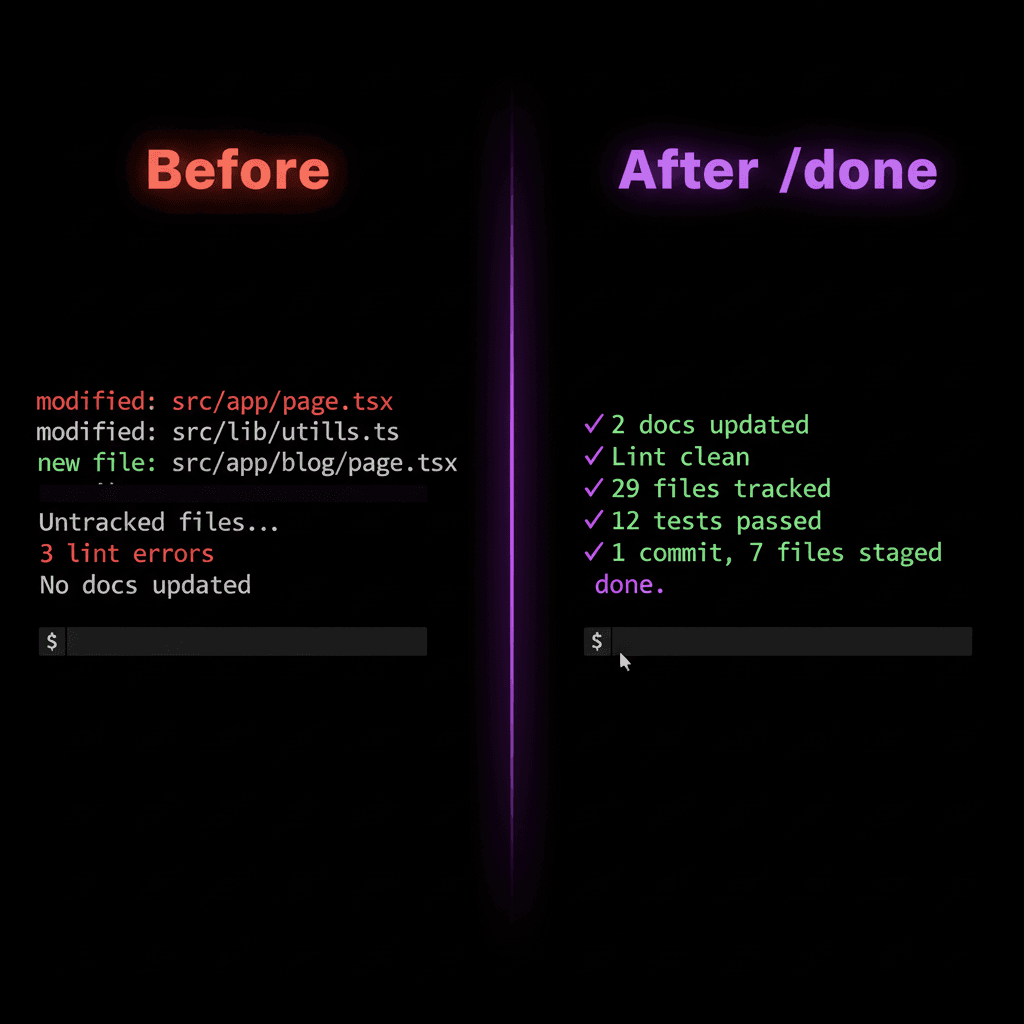
Architecture docs stay current
Every session updates the relevant docs in docs/architecture/, so the next person (or Claude session) has context.
Lint stays clean
Errors get fixed before they compound. Only session files are touched — no surprise diffs in unrelated code.
Commits are meaningful
Conventional commits with productivity stats in the body. You can see duration, files changed, and areas touched at a glance.
File sizes stay under control
A per-session file size report shows how many files are in each line-count bucket, broken down by type. Spot bloated files before they become a problem.
Test coverage is tracked
If you have a test runner, coverage stats are included in every commit. If not, the skill notes it and moves on — no broken builds.
Bug fixes get documented
When a session involves a bug fix, a structured report is auto-generated with symptom, root cause, fix, and a key rule to prevent recurrence.
You get a productivity report
Session duration, prompt count, lines changed — all computed automatically so you can track how you work.
Anatomy of a /done Skill
The skill file lives at .claude/skills/done/SKILL.md. It starts with YAML frontmatter for metadata, then contains the full instructions in markdown. Here's the structure:
1. Frontmatter & Timing
The frontmatter tells Claude Code when to suggest this skill and what arguments it accepts. The timing section ensures every phase is benchmarked.
---
name: done
description: Wrap up a coding session — update docs, lint, then commit.
argument-hint: "[optional commit message]"
---

Wrap up the current coding session.

## Timing & Stats

At the start of EACH phase, run `date +%s` to capture a timestamp.
At the end of each phase, capture another timestamp and compute the
elapsed time.

After all phases complete, output a summary table like this:

```
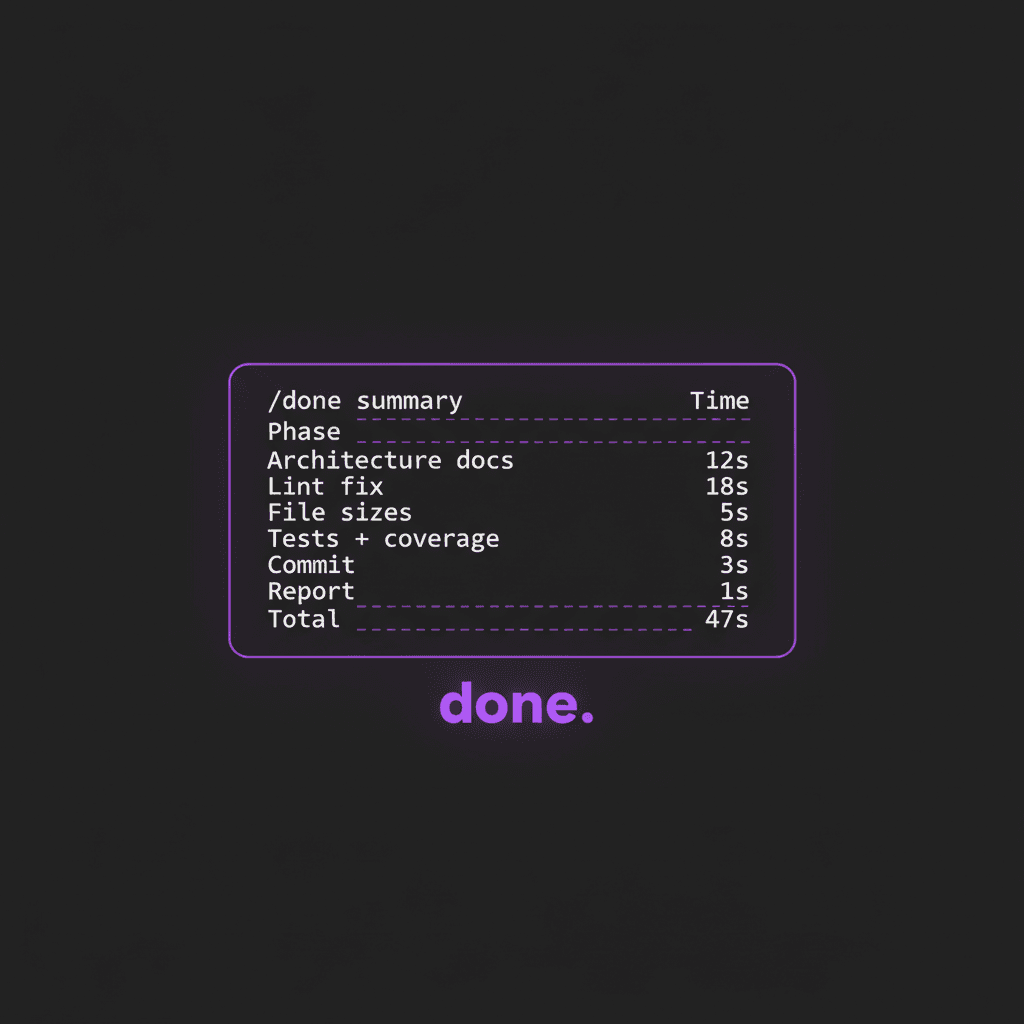
/done summary
───────────────────────────────────────
Phase                   Time     Count
───────────────────────────────────────
Architecture docs       12s      2 updated, 1 created
Lint fix                18s      3 errors fixed, 0 remaining
File sizes              5s       42 files, 1 over 500 lines
Tests + coverage        8s       12 passed, 0 failed, 42% lines
Commit                  3s       1 commit, 14 files staged
Report                  1s       session complete
───────────────────────────────────────
Total                   47s
```
2. Session File Detection
This is the most important design decision. You can't rely on git diff HEAD~N because multiple Claude Code sessions might be running on the same branch. Instead, the skill tells Claude to use its own conversation memory.
## Determining Session Files

Multiple Claude Code sessions may run concurrently on the same
branch, so git history (e.g., `HEAD~3`) is NOT a reliable way to
determine which files this session changed.

**Use your own memory of the conversation.** You know every file
you read, edited, created, or wrote during this session. Compile
that list directly — it's the only reliable source.

To get the list:
1. Review the conversation history for all Read, Edit, Write,
   Bash tool calls that modified files
2. Compile the deduplicated list of file paths
3. For line counts, run `git diff --stat` on only uncommitted
   files
3. The Phases
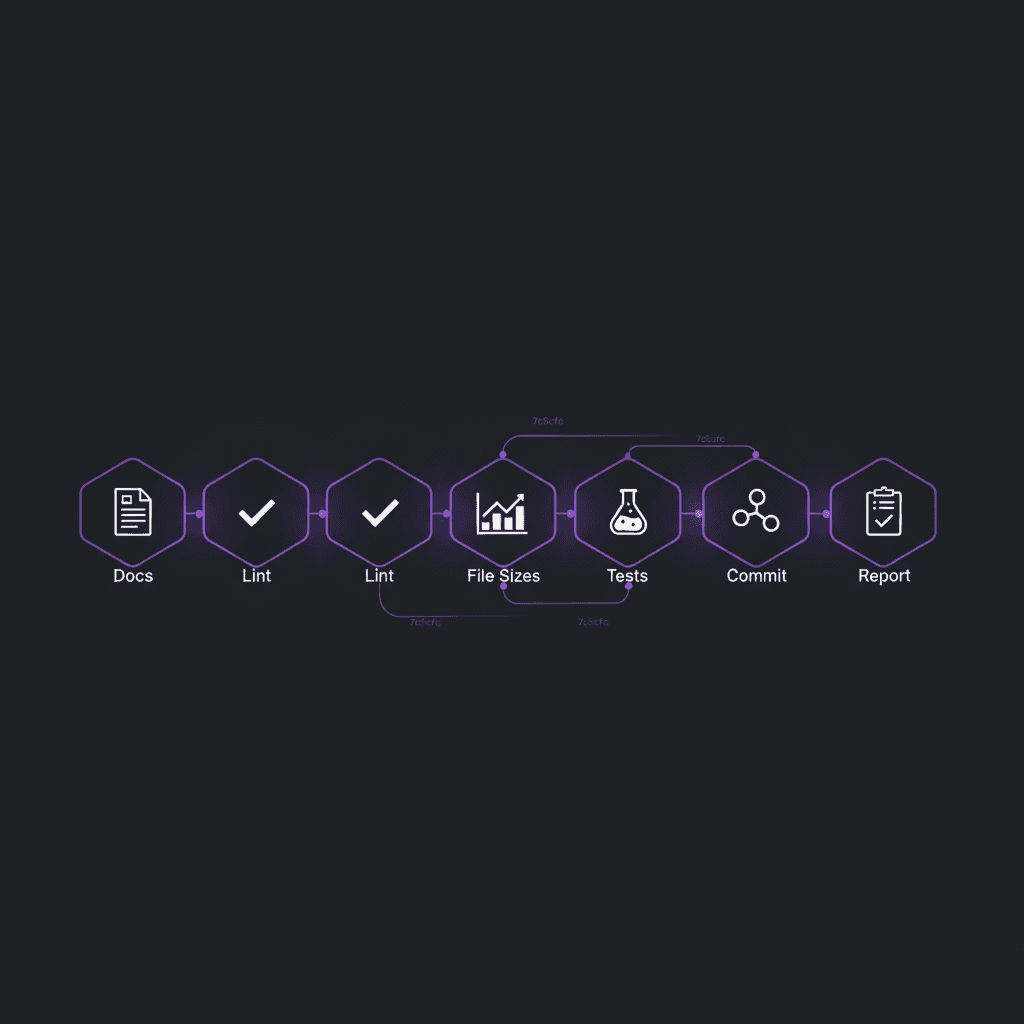
Break the wrap-up into discrete phases. Each project will have different needs — a project with tests might include a testing phase, while a static site might skip it. Here's a 6-phase setup that covers most projects:
### Phase 0: Gather Session Context

Compile session files, check for bug fixes, count modified files.

### Parallel Phase: Launch subagents for Phases 1-4

Launch ALL applicable phases as parallel subagents in a single
message. Each agent works independently and reports back.

  Agent: Architecture Docs (always)
  Agent: Bug Fix Docs (if a bug was fixed)
  Agent: Lint Fix (always)
  Agent: File Sizes (if 3+ files modified)
  Agent: Tests + Coverage (always)

### Phase 5: Commit (after all agents complete)

Stage all changed files and commit using conventional commits.
Include a session productivity summary in the commit body.

### Phase 6: Report

Output timing table, productivity stats, ASCII art of what was
built, and a dramatic goodbye message.
4. Safety Rules
Guardrails prevent the skill from doing anything destructive. These are non-negotiable.
## Rules

- Only fix lint errors in files you changed this session
- NEVER use --no-verify, --amend, or force push
- NEVER commit .env, secrets, or credential files
- Do NOT push unless the user explicitly asks
What It Looks Like in Action
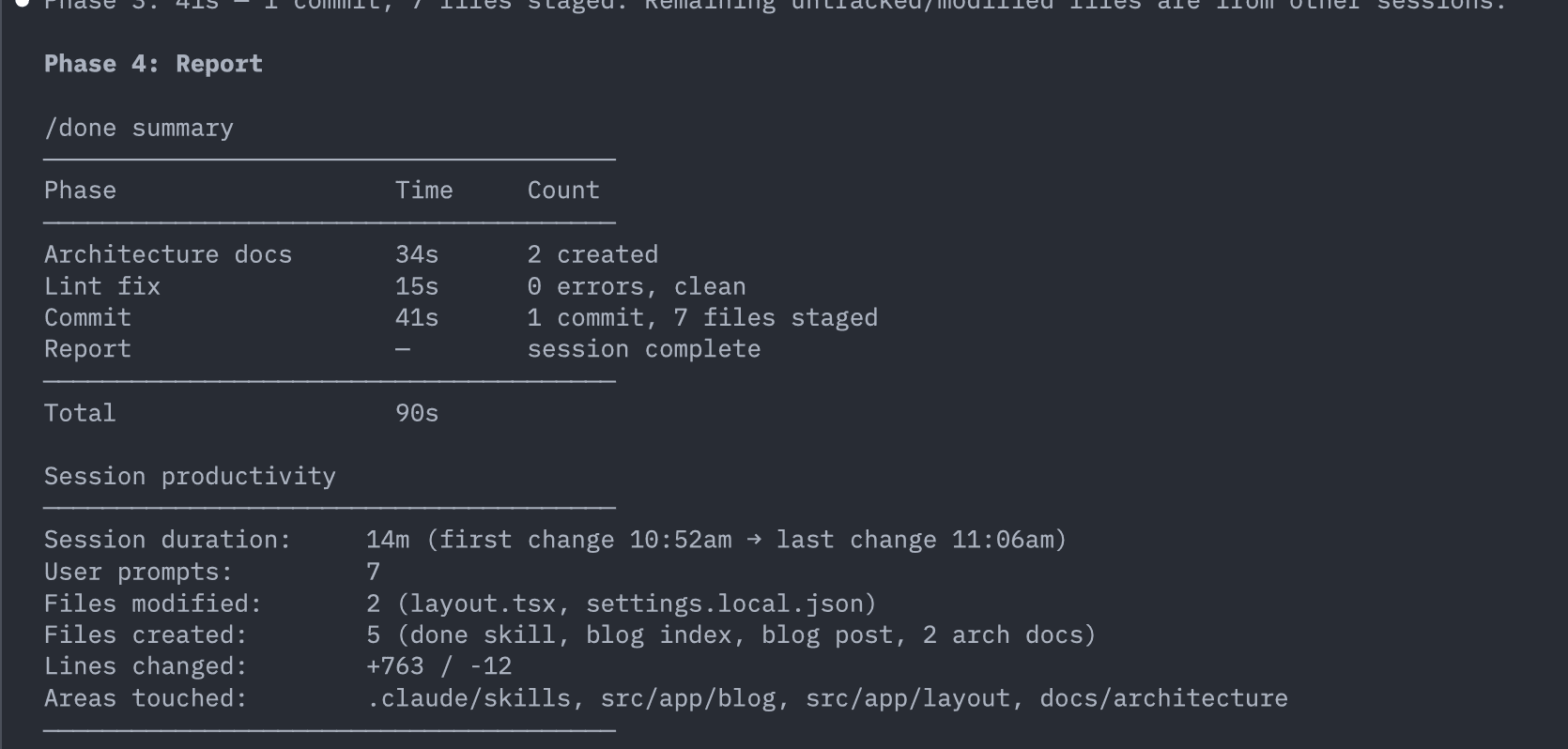
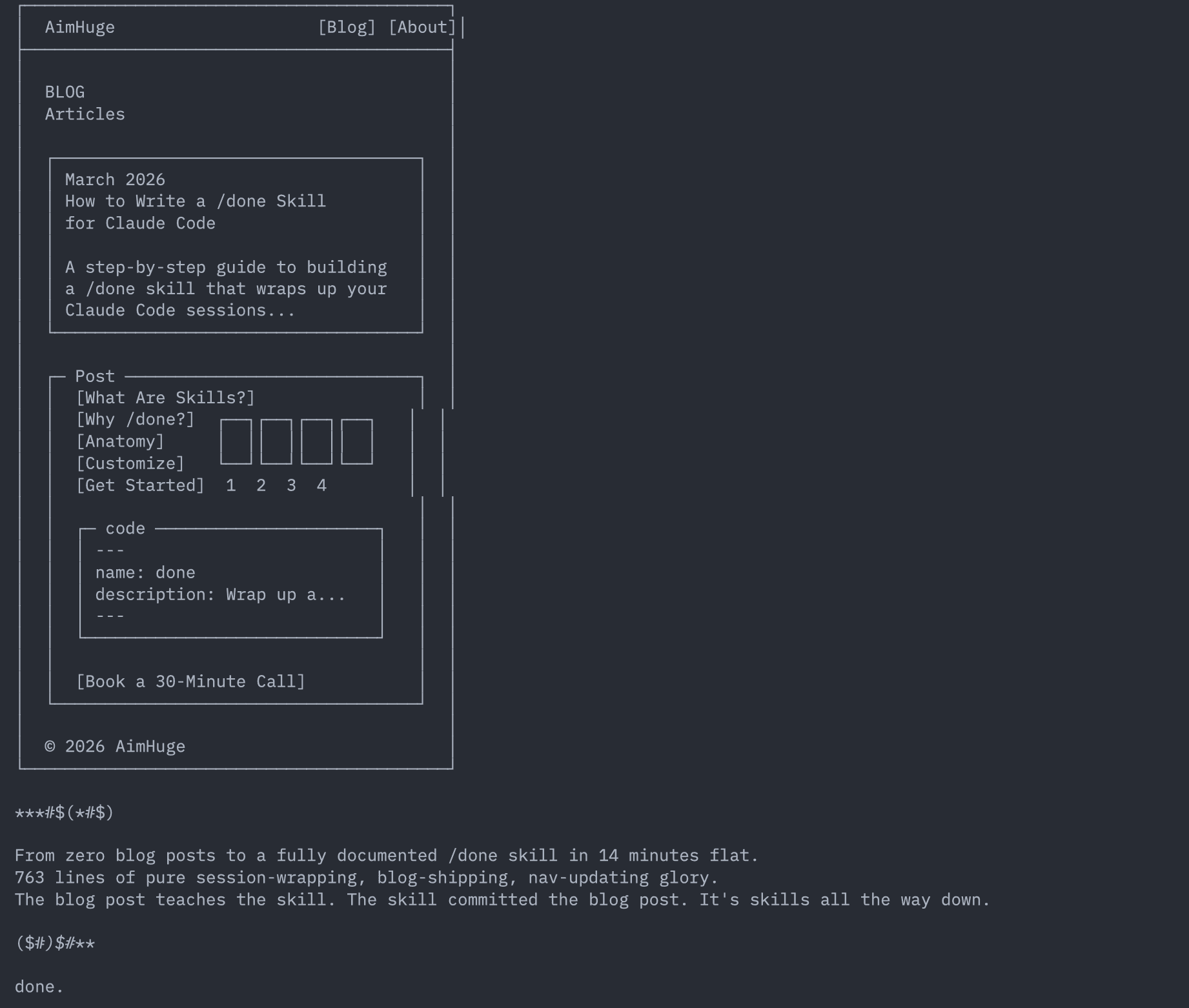
Here's real output from running /done at the end of a session where we built this very blog post:
The summary table and productivity report
ASCII art and the dramatic goodbye
Parallelizing with Subagents
The phases in a /done skill are mostly independent — architecture docs don't depend on lint results, and tests don't depend on file size scans. So why run them sequentially?
Claude Code can launch parallel subagents — independent processes that each handle one phase concurrently. The main agent gathers session context first, then fires off all applicable phases in a single message. Each subagent runs its phase, writes any files it needs to, and reports back. The main agent waits for all to complete, then handles the sequential phases (commit and report).
Four parallel agents running simultaneously
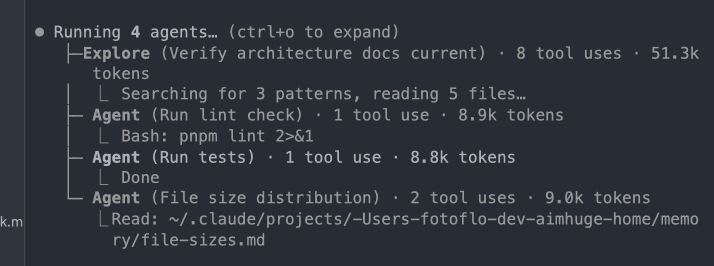
The key instruction in the skill is: "Launch ALL applicable phases as parallel subagents in a single message." This tells Claude to use the Agent tool multiple times in one response, which starts them concurrently. The phases are:
Architecture docs (always)
An Explore agent reads session files and updates docs/architecture/ to reflect the current state.
Bug fix docs (conditional)
Only launched if the session involved fixing a bug. Creates a numbered report in docs/bug-fixes/ with symptom, root cause, and fix.
Lint fix (always)
Runs the linter, fixes errors only in session files, and confirms clean output.
Tests (always)
Runs the test suite and reports pass/fail counts. Investigates failures if any.
File sizes (conditional)
Only if 3+ files were modified. Builds a distribution table and compares to the previous snapshot.
The result: what used to take 90+ seconds sequentially now completes in about 50 seconds — bounded by the slowest agent rather than the sum of all phases. And the commit phase still runs last, so it can incorporate fixes from any agent that found issues.
Tracking File Sizes & Test Coverage
Two optional phases that pay dividends over time. The file size report gives you a birds-eye view of your codebase health — how many files are small and focused vs. bloated and overdue for a refactor. The test coverage report keeps you honest.
File Size Distribution
The skill scans all source files, groups them by line count and file type, and outputs a table. It also saves a snapshot to Claude Code's memory so the next session can show a trend comparison — are your files getting smaller or bigger?
File sizes by type
──────────────────────────────────────────────────────────
Lines           .tsx   .ts   .css   .md   .json   Total
──────────────────────────────────────────────────────────
≤ 50              3     1      0     4      2      10
51–150            5     0      1     2      1       9
151–300           4     1      0     1      0       6
301–500           2     0      0     0      0       2
501–1000          1     0      1     0      0       2
1001–2000         0     0      0     0      0       0
2000+             0     0      0     0      0       0
──────────────────────────────────────────────────────────
Total            15     2      2     7      3      29
Largest: page.tsx (491 lines)
Test Coverage Summary
If your project has a test runner configured, the skill runs your test suite and generates a coverage summary. If not, it gracefully notes "no test runner configured" and moves on — no broken builds, no skipped commits.
Test coverage
──────────────────────────────────────
Stmts: 45%  Branch: 30%  Funcs: 38%  Lines: 42%
Tests: 12 passed, 0 failed
──────────────────────────────────────
Customizing for Your Project
The beauty of a /done skill is that it adapts to your stack. Here are the knobs you should tune:
Add or remove phases
A React Native app might add a "Write Tests" phase that extracts pure logic from components into utils/ and writes unit tests. A static site might skip testing entirely. A monorepo might add a "Type Check" phase with tsc --noEmit.
Add coverage and file size tracking
For projects with tests, add phases that run coverage reports and compare against previous sessions. You can save snapshots to Claude Code's memory directory and show trend lines over time — watch your coverage climb session by session.
Compose with other skills
Instead of inlining lint logic, create a separate /lint-fix skill and call it from /done. Same for /rename (to name the session) or /simplify (to review for code quality before committing).
Tune the commit format
The commit body is where the session summary lives. Customize what metrics matter to your team. Here's what ours looks like:
feat: add workshop scheduling page

Session summary:
- Duration: 1h 23m
- User prompts: 8
- Files modified: 14, created: 3
- Lines: +187 / -42
- Lint: 3 errors fixed, 0 remaining in session files
- File sizes: 29 files, largest 491 lines
- Tests: 12 passed, 0 failed
- Coverage: Stmts 45% | Lines 42%
- Docs: 2 updated, 1 created
- Areas: src/app/workshop, src/app/page.tsx

Co-Authored-By: Claude Opus 4.6 (1M context) <noreply@anthropic.com>
Getting Started
Don't want to write it from scratch? Install the skill from GitHub
The complete /done skill — its SKILL.md plus the helper scripts — lives in my public skills repo. Grab it directly:
Clone the repo and symlink the skill into ~/.claude/skills/:
git clone https://github.com/fotoflo/claude-skills.git
ln -s "$PWD/claude-skills/done" ~/.claude/skills/done
Prefer to understand every line first? Build it by hand with the steps below.
The complete SKILL.md
Raw on GitHub ↗Pulled straight from the repo at build time — this is the exact file the skill ships, not a paraphrase.
---
name: done
description: Wrap up a coding session — update docs, lint, then commit. Use when the user says "done", "wrap up", or "finish".
argument-hint: "[optional commit message]"
model: sonnet
---

Wrap up the current coding session.

## Context budget (READ FIRST — avoids the "1M context credits" error)

This skill MUST run entirely on standard 200k context (Sonnet/Haiku), never on a
1M-context model. A 1M-context model bills 1M-context credits and fails with
"Usage credits required for 1M context" when those credits are off.

- The `model: sonnet` frontmatter pins the orchestration to Sonnet 200k. If you
  are reading this while on a 1M-context model (e.g. `*-opus-*[1m]`), do NOT run
  the heavy phases inline — delegate everything to the standard-context subagents
  below, and tell the user they can re-invoke as "run /done with sonnet 200k" for
  a fully standard-context run.
- The parallel phase runs on the Puku gateway (see below), which spends no Anthropic
  tokens or credits at all. The rule below covers the fallback path.
- EVERY `Agent` call in this skill MUST pass an explicit `model` (use `"haiku"`).
  A subagent with no `model` inherits the parent session's model — which on a 1M
  session means a 1M-context subagent and the credit error. Never omit `model`.

## Timing & Stats

At the start of EACH phase, run `date +%s` to capture a timestamp. At the end of each phase, capture another timestamp and compute the elapsed time.

After all phases complete, output a summary table like this:

```
/done summary
-----------------------------------------------
Phase                   Time     Count
-----------------------------------------------
Architecture docs       12s      2 updated, 1 created
Bug fix docs             5s      1 created (or "no bug fix")
Lint fix                18s      3 errors fixed, 0 remaining
File sizes              5s       42 files, 1 over 500 lines
Tests + coverage        8s       12 passed, 0 failed, 42% lines
Commit                  3s       1 commit, 14 files staged
Report                  1s       session complete
-----------------------------------------------
Total                   34s
```

Adjust the "Count" column to reflect what actually happened in each phase. Be specific with numbers.

## Determining Session Files

Multiple Claude Code sessions may run concurrently on the same branch, so git history (e.g., `HEAD~3`) is NOT a reliable way to determine which files this session changed.

**Use your own memory of the conversation.** You know every file you read, edited, created, or wrote during this session. Compile that list directly — it's the only reliable source.

To get the list:
1. Review the conversation history for all `Read`, `Edit`, `Write`, `Bash` tool calls that modified files
2. Compile the deduplicated list of file paths — these are your "session files"
3. For line counts, use `.claude/skills/done/session-stats.sh` on your session files, plus check any commits YOU made this session

Do NOT use `HEAD~N` or broad `git diff` ranges — other sessions may have committed in between.

## Productivity Summary

After the phase summary, generate a session productivity report.

Run `.claude/skills/done/session-stats.sh <file1> <file2> ...` with your session files to get modification timestamps and line change stats.

Output:

```
Session productivity
-----------------------------------------------
Session duration:     1h 23m (first change 2:15pm -> last change 3:38pm)
User prompts:         8
Files modified:       14
Files created:        3
Lines changed:        +187 / -42
Areas touched:        src/app/workshop, src/app/page.tsx
-----------------------------------------------
```

The `session-stats.sh` script handles line counts and session duration from modification timestamps.

To count user prompts: count the number of distinct user messages in the current conversation (excluding system messages and tool results).

## Steps

### Phase 0: Gather Session Context

Before launching parallel agents, prepare the context they'll need:

1. **Compile session files** — review the conversation history for all files YOU touched (see "Determining Session Files" above).
2. Run `.claude/skills/done/gather-context.sh` to see current state (git diff stats, existing docs, uncommitted files).
3. Determine: was a bug fixed this session? (needed to decide if bug-fix doc agent should run)
4. Determine: were 3+ files modified? (needed to decide if file-sizes agent should run)

### Parallel Phase: Phases 1-4 as one Puku batch

Run the applicable phases as parallel subagents on the Puku gateway, through the
`puku-agent` skill: one batch, one command. Puku costs nothing and spends no Anthropic
tokens, and each agent's file reads and test output stay out of your context. Only its
report comes back.

Use the Agent tool instead (`model: "haiku"`, explicit) only when
`~/.claude/skills/puku-agent` is missing or the batch fails with a credentials error.
The phase sections below then become the agents' prompts, unchanged.

Always run:
- **Architecture docs**
- **Tests**

Conditionally run:
- **Bug fix docs**: only if a bug was fixed this session
- **File sizes**: only if 3+ files were modified
- **Lint fix**: first run `.claude/skills/done/lint.sh <session files>` yourself. It's one
  command. Add the lint task only if it reports errors in session files.

1. **Write one prompt file per phase** in your scratchpad (not the repo). Each one holds:
   - the session file list;
   - a paragraph on WHAT changed this session and WHY. The subagent can't see this
     conversation, and the why exists only there. The docs agents need it most;
   - the phase's instructions from its section below.
2. **Write the tasks file** next to them. Drop the entries whose phase doesn't apply, and
   use absolute `prompt_file` paths:
   ```json
   [
     {"id": "arch-docs",   "model": "opus-4.8",    "tools": "write", "prompt_file": "<dir>/arch-docs.md"},
     {"id": "bug-fix-doc", "model": "opus-4.8",    "tools": "write", "prompt_file": "<dir>/bug-fix-doc.md"},
     {"id": "lint",        "model": "puku-ai-2.8", "tools": "bash",  "prompt_file": "<dir>/lint.md"},
     {"id": "file-sizes",  "model": "puku-ai-2.8", "tools": "bash",  "prompt_file": "<dir>/file-sizes.md"},
     {"id": "tests",       "model": "opus-4.8",    "tools": "bash",  "prompt_file": "<dir>/tests.md"}
   ]
   ```
3. **Run it from the repo root, in the background** (`run_in_background: true`; a batch
   takes a few minutes):
   ```bash
   node ~/.claude/skills/puku-agent/puku-agent.mjs --batch <dir>/tasks.json --out <dir>/out --workdir . --quiet
   ```
4. When it finishes, read `<dir>/out/summary.json` and each `<dir>/out/<id>.md`.

### Verify the batch (before Phase 5)

The reports are leads, not facts, and the Puku models are weaker than you:
- **Lanes.** Run `git status --short` and compare it with what each agent may touch:
  docs → `docs/architecture/`, `docs/bug-fixes/`; lint → the session files;
  file sizes → `docs/file-sizes.md`; tests → nothing. `git diff` anything outside
  those lanes, and restore it unless it's a fix you'd have made yourself.
- **Docs.** Read every doc diff. Check each file path, function name, and number it
  cites against the code, because doc agents invent details. Fix what's wrong
  yourself. That's cheaper than another round.
- **Status.** If a phase is `incomplete` or `error`, do it yourself, or rerun just that
  task with a narrower prompt.
- **Tests.** A failure report tells you where to look. Fixing it is your job.

---

#### Agent: Architecture Docs (Phase 1)

Prompt the agent with the session file list and these instructions:

1. Run `ls docs/architecture/` to see existing docs.
2. Identify which feature areas were modified based on the session files.
3. Read the key changed files to understand the current state.
4. For each affected area, check if a doc exists in `docs/architecture/`:
   - If yes, read it and update it to reflect the new state
   - If no, create a new doc following the pattern of existing ones
5. Each architecture doc should include:
   - **Overview**: What this feature/area does
   - **Key files**: File paths and their roles
   - **Data flow**: How data moves through the system (if applicable)
   - **Important patterns**: Conventions, gotchas, or design decisions

Tell the agent to report back what it created/updated.

#### Agent: Bug Fix Docs (Phase 1.5)

**Only launch if the session involved fixing a bug.**

Prompt the agent with the bug details (symptom, root cause, and the fix, written out from
this conversation, which the agent can't see) and these instructions:

1. Run `ls docs/bug-fixes/` to find existing reports and determine the next number (e.g., `002`).
2. Create `docs/bug-fixes/NNN-short-description.md` with:
   - **Date** and **Severity** (Critical / High / Medium / Low)
   - **Symptom**: What the user saw. Be specific.
   - **Root Cause**: Technical explanation with code snippets showing the problematic pattern.
   - **Why It Was Hard to Find** (optional): If significant debugging effort was needed.
   - **The Fix**: What was changed and why, with before/after code snippets.
   - **Key Rule**: A one-line rule to prevent this class of bug in the future.
   - **Files Involved**: List of files changed to fix the bug.

Tell the agent to report back the filename it created.

#### Agent: Lint Fix (Phase 2)

Prompt the agent with the session file list and these instructions:

1. Run `.claude/skills/done/lint.sh <session files>` to find ESLint violations in them.
2. Fix those errors. Make mechanical fixes only (unused imports, missing hook deps, ordering).
   If an error needs a design decision, leave it and report it.
3. Re-run `.claude/skills/done/lint.sh <session files>` to confirm the fixes.
4. Do NOT touch any file that isn't in the session list.

Tell the agent to report back how many errors were found and fixed, and which ones it left alone.

#### Agent: File Sizes (Phase 3)

**Only launch if 3+ files were modified this session.**

Prompt the agent with these instructions:

1. Run `.claude/skills/done/file-sizes.sh` to scan all source files and build the size distribution.

2. The script outputs a distribution table (buckets: <=50, 51-150, 151-300, 301-500, 501-1000, 1001-2000, 2000+) with the largest file.

3. Read `docs/file-sizes.md` for the previous snapshot. Show a delta comparison (only rows that changed).

4. Save the new snapshot to `docs/file-sizes.md` with today's date.

Tell the agent to report back the tables and any notable changes.

#### Agent: Tests + Coverage (Phase 4)

Prompt the agent with these instructions:

1. Run `.claude/skills/done/tests.sh <session files>`. With vitest, that runs only the tests
   related to the session files. Otherwise it runs the whole suite.
2. Do NOT edit any file. If tests fail, read the failing test and the code it exercises,
   and work out the likely cause.
3. Report back: number of test files, tests passed, tests failed, and duration. For each
   failure, give the test name, the first lines of the error, and the likely cause with path:line.

---

### Phase 5: Commit (sequential — after all agents complete)

Wait for all parallel agents to complete, then:

1. Collect results from all agents.
2. Build the commit message using conventional commits:
   - If $ARGUMENTS is provided, use it as the first line
   - Otherwise, draft a summary of the session's changes as the first line
   - Append the session productivity summary to the commit body, formatted like:
     ```
     feat: summary of changes

     Session summary:
     - Duration: 1h 23m
     - User prompts: 8
     - Files modified: 14, created: 3
     - Lines: +187 / -42
     - Lint: 3 errors fixed, 0 remaining in session files
     - File sizes: 29 files, largest 491 lines
     - Tests: 12 passed, 0 failed (or "no test runner")
     - Coverage: Stmts 45% | Lines 42% (if available)
     - Docs: 2 updated, 1 created
     - Areas: src/app/workshop, src/app/page.tsx

     Co-Authored-By: Claude Opus 4.8 (1M context) <noreply@anthropic.com>
     ```
3. Run `.claude/skills/done/commit.sh "commit message" file1 file2 ...` with all relevant changed files: the docs and lint fixes the agents made (after you verified them), plus any test fixes you made.
4. The script stages, commits, and runs `git status` to confirm everything is clean.

### Phase 5.5: Sync new skills to user level

Check if any skills in this project's `.claude/skills/` are missing from the user-level `~/.claude/skills/`. For each skill directory that exists in the project but not at the user level:

1. Copy the entire skill directory to `~/.claude/skills/<skill-name>/`
2. Report which skills were copied

Skip skills that already exist at the user level (don't overwrite — the user-level version may have been customized). Only copy net-new skills.

### Phase 6: Report (sequential)

1. Output the `/done summary` table and `Session productivity` block (see Timing & Stats above).

2. **ASCII art** — draw a simple ASCII art representation of the main page or UI that was built/changed this session. Include key elements like layout, sections, or content that reflect what was worked on. Keep it fun and recognizable. **IMPORTANT: Use ONLY plain ASCII characters** (`+`, `-`, `|`, `=`, `*`, `#`, `/`, `\`, letters, numbers). Do NOT use Unicode box-drawing, block elements, or special arrows — they misalign in the terminal.

3. **Goodbye message** — end with a dramatic, fun goodbye message wrapped in `***#$(*#$)` and `($#*)$#***` markers. Include 3-4 lines celebrating what was accomplished in the session, referencing specific technical wins or funny moments from the work. End with "done."

## Rules

- Focus on documenting the CURRENT state, not the history of changes
- Keep docs concise — aim for quick reference, not exhaustive documentation
- Don't document trivial changes (typo fixes, formatting)
- Match the style of existing docs in `docs/architecture/`
- Only fix lint errors in files you changed this session — don't go on a codebase-wide cleanup
- NEVER use `--no-verify`, `--amend`, or force push
- NEVER commit `.env`, secrets, or credential files
- Do NOT push unless the user explicitly asksCreate the skill file
Make a directory at .claude/skills/done/ and add a SKILL.md file with the frontmatter, phases, and rules shown above.
Adapt the phases to your stack
Add test phases if you have a test runner. Remove architecture docs if you don't want them. The phases are just markdown sections — add or remove as needed.
Commit it to your repo
Check the skill into version control so every team member and every Claude Code session gets the same workflow.
Type /done at the end of your session
That's it. Claude handles the rest — docs, lint, commit, and a productivity report with ASCII art.
The Full Picture
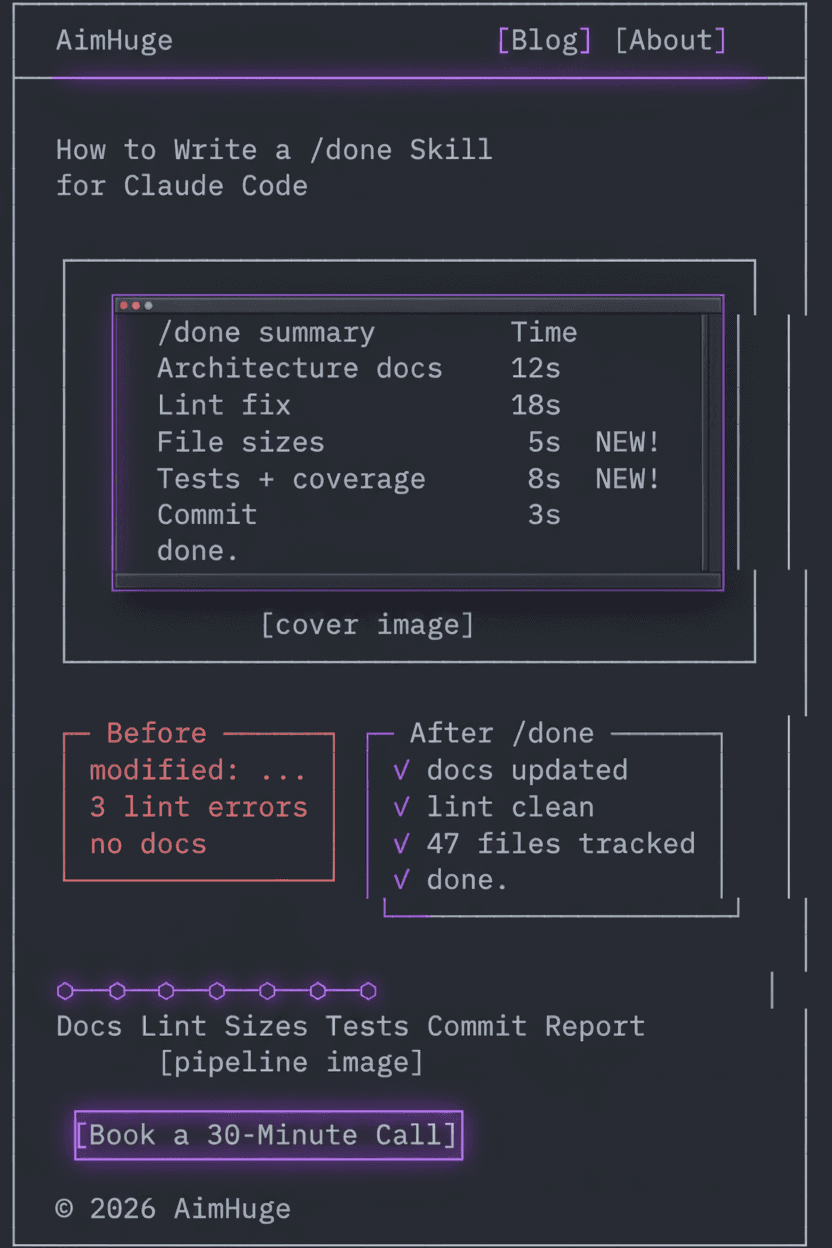
Here's the entire /done workflow visualized — from the summary table to the before/after comparison to the 6-phase pipeline:
Want help setting up Claude Code for your team?
I run AI workshops that cover Claude Code skills, workflows, and getting the most out of AI-assisted development.
Book a 30-Minute Call